Friday, March 21, 2014


Wednesday, March 19, 2014
Picture pand

There is a picture emerging eating mcdonalds.
Pictured get a panda and a man cominedo macdonals.
They are in the floor of a house

Friday, March 14, 2014

Wednesday, March 12, 2014


interview
N: hey man.
M: hello.
N: How are you?
M: I’m fine, thanks.
N: what’s up?
M: I’m coming to this job interview.
N: Okay. What’s your name?
M: My name is Marc.
N: How old are you?
M: I’m 16 years old.
N: oh! You are a baby.
M: But I’m a genius.
A: (comes in the room and shouts): Oh! This is Marc
Gomez is an IT genius!!
N:Why should I hire you?
M:But I love the computers and I have experience.
N:Why you want to work here?
M:But I have seen the company and I am interested
N: I will hire you.
Monday, March 10, 2014
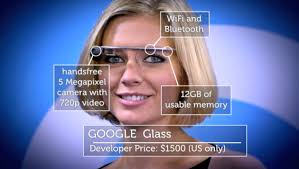
google glass
I think google goggles glass serve much help because I saw a video that when they took people who had alzheimer used it to remind of the things they have done, also used for many other things as a gps, navigator ...
My opinion about the sexuali
My opinion on the homosexuality is that everyone is free to be as it is, I respect your desicion and does not affect me in every way, with the treatment as normal people and people who do not respect or not to accept your desicion is that even not in the modern age.



Wednesday, March 5, 2014
instruction of the word
Open microsoft word and write what is in the text.
To underline the word you have to select the word and you go home and you see where there is a letter A is below the red i will change color.
To put the underlined word to go where there's an underlined S and her cliques.
To set the background of lilac has gotta go where there is a paint can i change it exactly.
word processor
YOU CAN:
funtions
copy
past
zoom in/out
change the font size
change thefont colour
change the text into
change the colour of the underline
change the font type
insert images
insert tables
inster symbols
insert page footer
insert graphics
change the text into bold
insert a cover
clear the format of selected text
add colour to the text background=highlight the selected text
insert column
delete
duplicate
save as the document
erase
undo
redo
funtions
copy
past
zoom in/out
change the font size
change thefont colour
change the text into
change the colour of the underline
change the font type
insert images
insert tables
inster symbols
insert page footer
insert graphics
change the text into bold
insert a cover
clear the format of selected text
add colour to the text background=highlight the selected text
insert column
delete
duplicate
save as the document
erase
undo
redo
Subscribe to:
Posts (Atom)